Wizely
Empowering users on their Financial Wellness journey
Wizely is a financial Wellness platform for users who are new to their Financial Wellness journey which helps users set budgets, spend money responsibly and save towards their goals. Initially, we started out as a small platform that helps users to set budgets, track them and save in Fixed and Recurring deposits. We wanted to expand and become a platform that users can rely on to understand the basics of Financial Wellness and start saving / investing with us.
User Problems
Budgeting & Saving Ignorance
A lot of users didn't know how to set realistic budgets and were unaware that they need to save in different instruments for better returns.
Trust Deficit
Users had problems trusting the platform to start saving.
Financial Literacy Gap
Users new to their financial journey didn't understand the concept of Credit score and had difficulty understanding the term Financial Wellness.
Lack of Motivation
Most users were not motivated to stay on the path towards Financial Wellness.
Approach & Personas
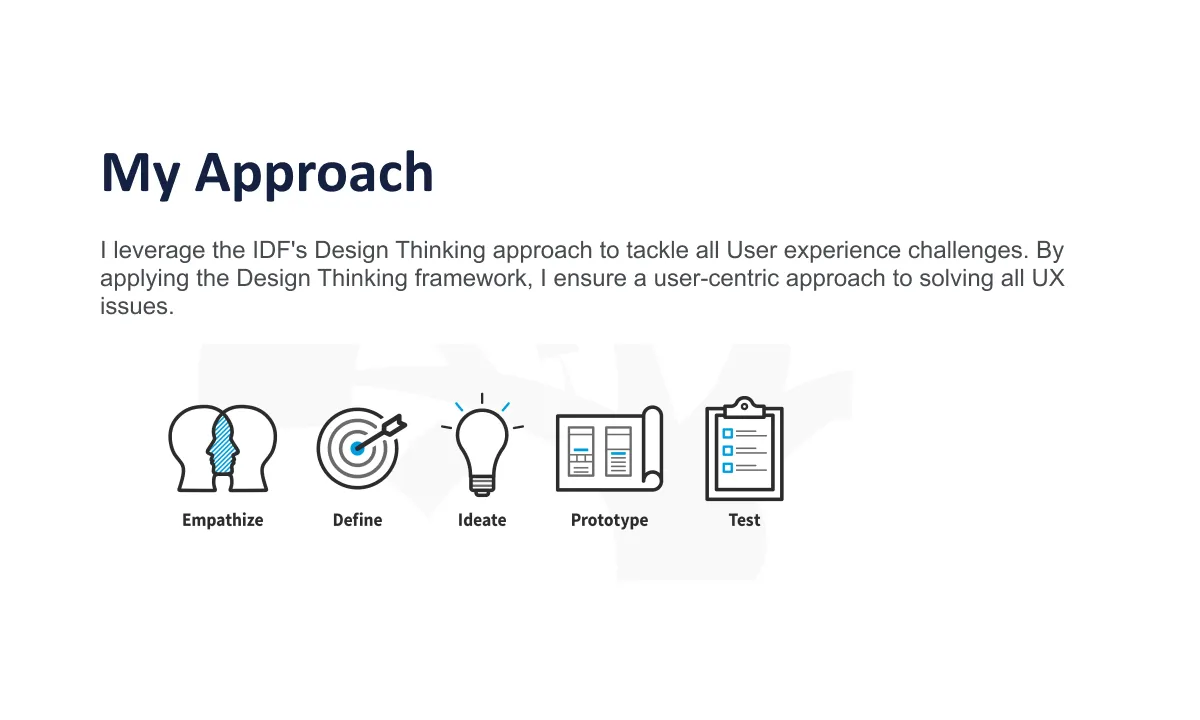
I leverage the IDF's Design Thinking approach (Empathize, Define, Ideate, Prototype, Test) to tackle all User experience challenges, ensuring a user-centric approach to solving all UX issues.
| Persona | Occupation | Financial Knowledge | Financial Goals | Pain Points |
|---|---|---|---|---|
| New Graduate Student | Recent college graduate | Low - Limited understanding of budgeting, saving, and financial products. | Short-term: Pay off student loans, build emergency fund. Long-term: Save for a car or travel. | Feels overwhelmed by financial decisions. Unsure how to budget her new income. Wants to avoid getting into debt. |
| Budgeting Beginner | Marketing professional | Basic - Spends more than he saves. Has some credit card debt. | Get out of debt, create a budget, start saving for retirement. | Feels like he lives paycheck to paycheck. Doesn't know how to create a realistic budget. Struggles to track spending. |
| Savings Beginner | Teacher | Moderate - Understands importance of saving but lacks a plan. | Save for a down payment on a house. Invest for long-term financial security. | Feels paralyzed by different saving options. Worries about making wrong investment decisions. Needs guidance. |
Ideation
Here's what we wanted to add to make the app more relevant to the users:
Wellness Score
Introduced Wellness Score concept to help users understand where they are in their journey towards Financial Wellness.
Gamification
Added gamification mechanics to make it more interesting and rewarding for users to stick on their path to Financial Wellness. Issued rewards for completing certain challenges.
Information Hierarchy
Rearranged the information according to the user needs and importance on the dashboard.
Blogs
Created and maintained WizeUp for educating users about Financial Wellness.
Dashboard Revamp
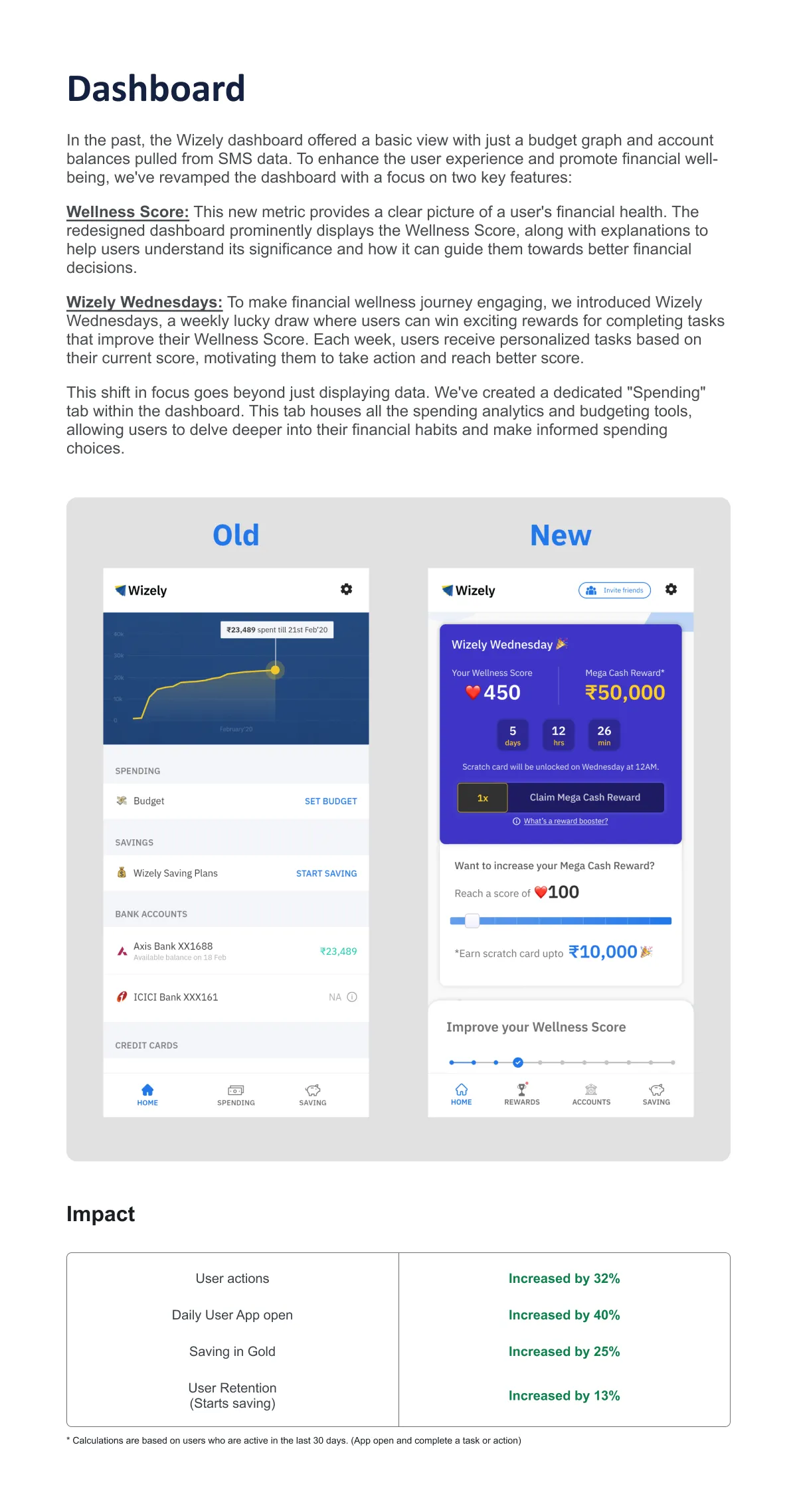
In the past, the Wizely dashboard offered a basic view with just a budget graph and account balances pulled from SMS data. To enhance the user experience and promote financial well-being, we've revamped the dashboard with a focus on two key features. This shift in focus goes beyond just displaying data. We've created a dedicated 'Spending' tab within the dashboard. This tab houses all the spending analytics and budgeting tools, allowing users to delve deeper into their financial habits and make informed spending choices.
Wellness Score
This new metric provides a clear picture of a user's financial health. The redesigned dashboard prominently displays the Wellness Score, along with explanations to help users understand its significance and how it can guide them towards better financial decisions.
Wizely Wednesdays
To make financial wellness journey engaging, we introduced Wizely Wednesdays, a weekly lucky draw where users can win exciting rewards for completing tasks that improve their Wellness Score. Each week, users receive personalized tasks based on their current score, motivating them to take action and reach better score.
Enhanced Spending Insights
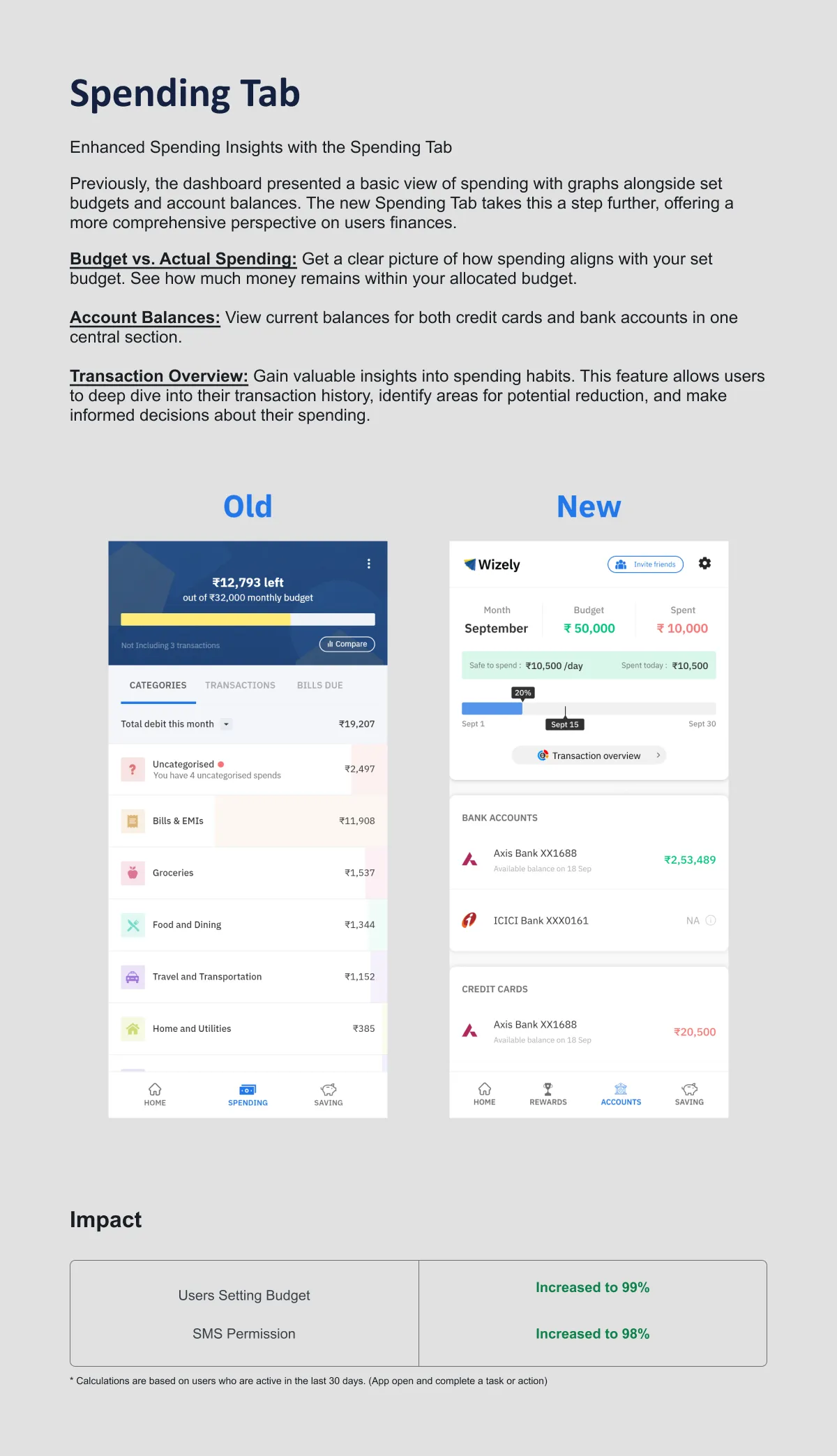
Previously, the dashboard presented a basic view of spending with graphs alongside set budgets and account balances. The new Spending Tab takes this a step further, offering a more comprehensive perspective on users finances.
Budget vs. Actual Spending
Get a clear picture of how spending aligns with your set budget. See how much money remains within your allocated budget.
Account Balances
View current balances for both credit cards and bank accounts in one central section.
Transaction Overview
Gain valuable insights into spending habits. This feature allows users to deep dive into their transaction history, identify areas for potential reduction, and make informed decisions about their spending.
Savings Tab
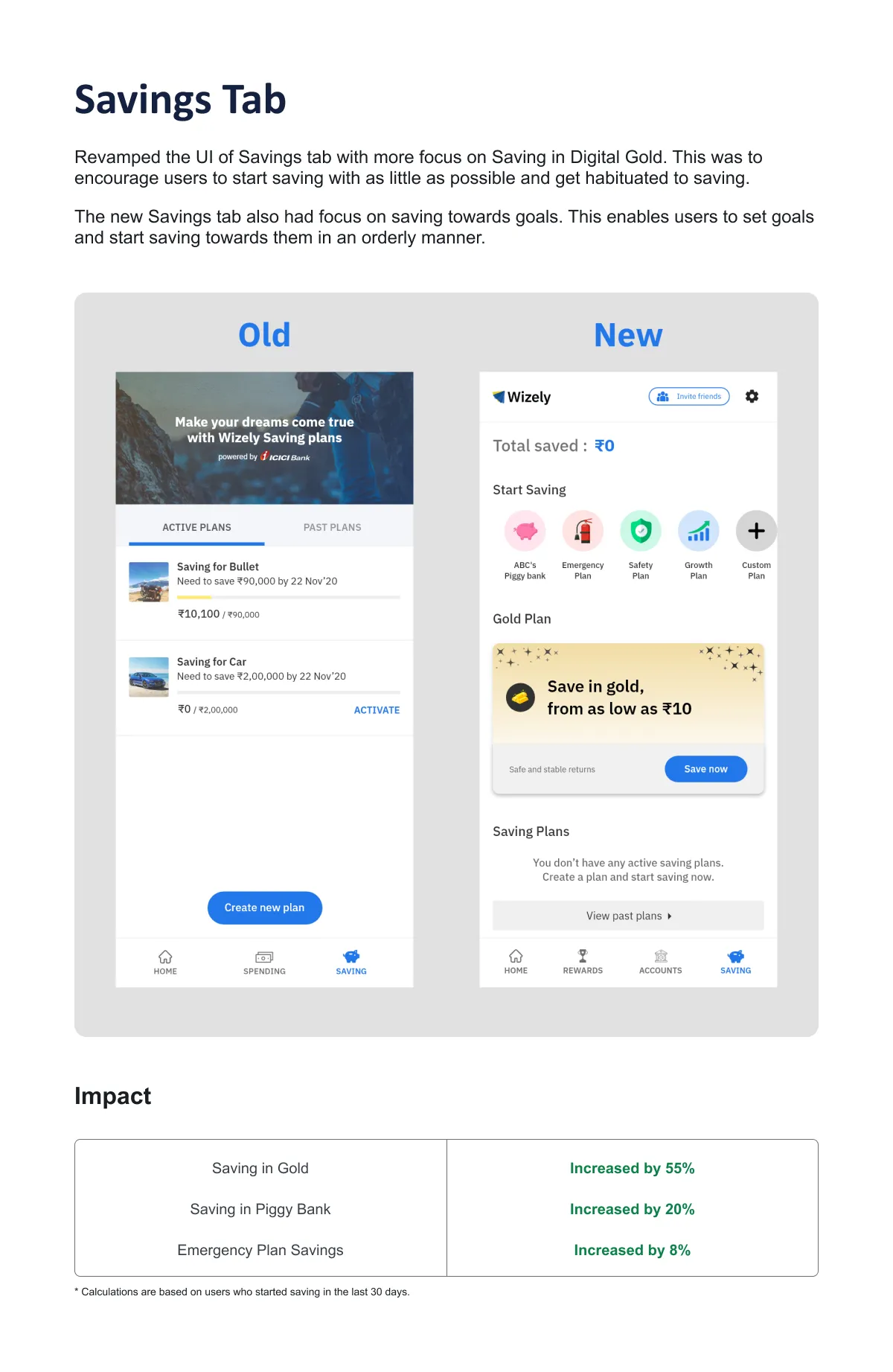
Revamped the UI of Savings tab with more focus on Saving in Digital Gold. This was to encourage users to start saving with as little as possible and get habituated to saving. The new Savings tab also had focus on saving towards goals. This enables users to set goals and start saving towards them in an orderly manner.
Rewards and Challenges
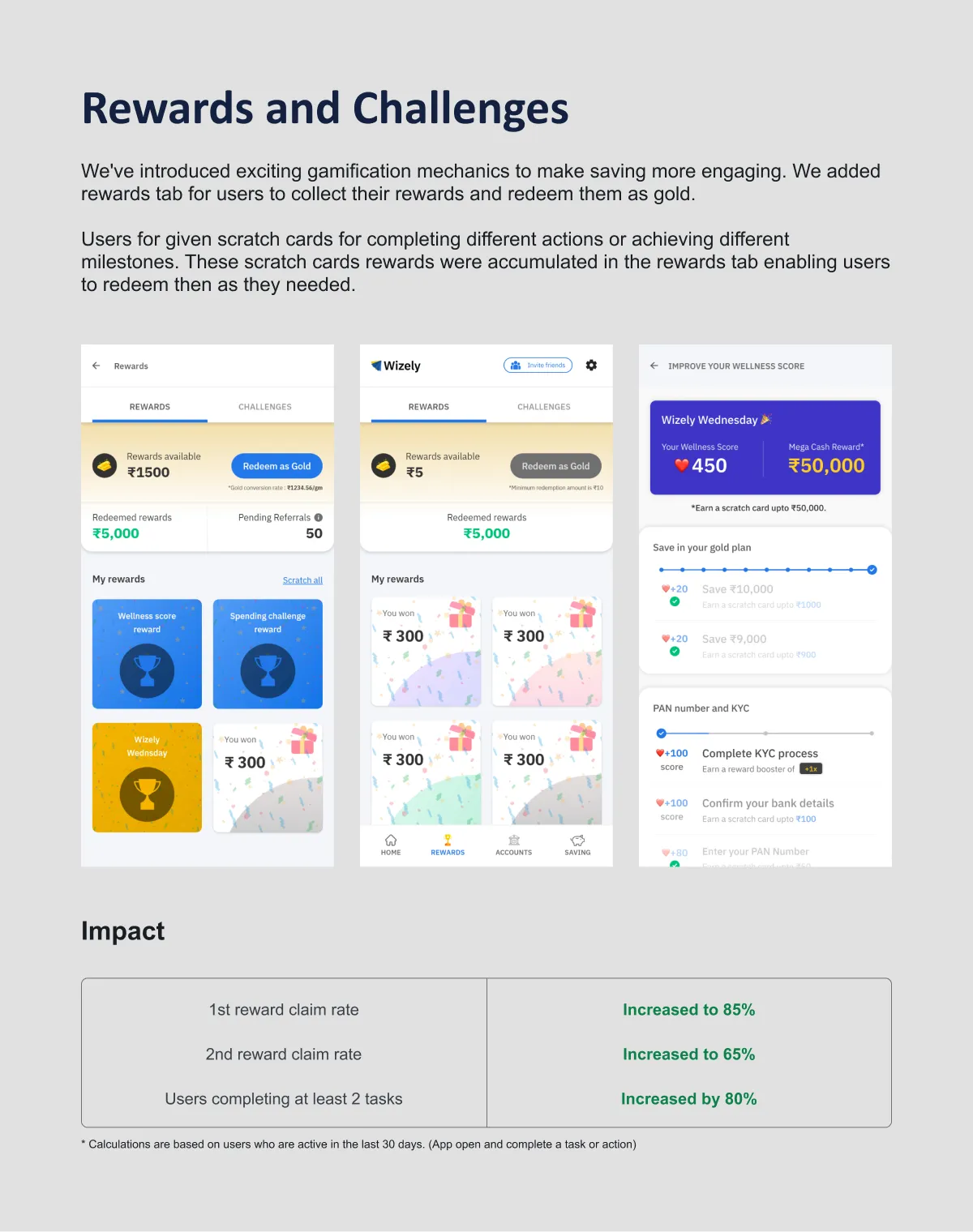
We've introduced exciting gamification mechanics to make saving more engaging. We added rewards tab for users to collect their rewards and redeem them as gold. Users were given scratch cards for completing different actions or achieving different milestones. These scratch cards rewards were accumulated in the rewards tab enabling users to redeem then as they needed.
Overall Metrics and Improvements
| Metric | Previous | Current |
|---|---|---|
| User drop-off rate (Before 7 days) | 60% | 22% |
| SMS Permission | 30% | 98% |
| 1st reward claim rate | 40% | 85% |
| Saving plan creation | 3% | 12% |
| User retention rate (3 weeks) | 12% | 31% |
| Weekly active users (app open) | 24% | 65% |
Reference Designs
Below are additional reference screens designed for the Wizely platform.